Smaller releases reach customers faster and shorten the distance between an idea and useful feedback.
Our development
A public record of what has shipped, how the product is maturing, and where the next engineering effort is going.
Operational depth, shipped in verified slices.
Since 21 July, the work has concentrated on endpoint experience, attended support, software governance, reporting, independent product identity and recovery evidence—while keeping preview packaging and general-availability claims clearly separated.
Native Windows service and Companion, managed Linux experience, deep inventory, daily update controls and attended support.
Device-authenticated commands, HTTPS, pinned SHA-256 payloads, outcome telemetry and an Authenticode gate before general Windows distribution.
Operational reporting, scheduled delivery, active-use evidence, licence governance and service workflows in one workspace boundary.
How we develop—and why.
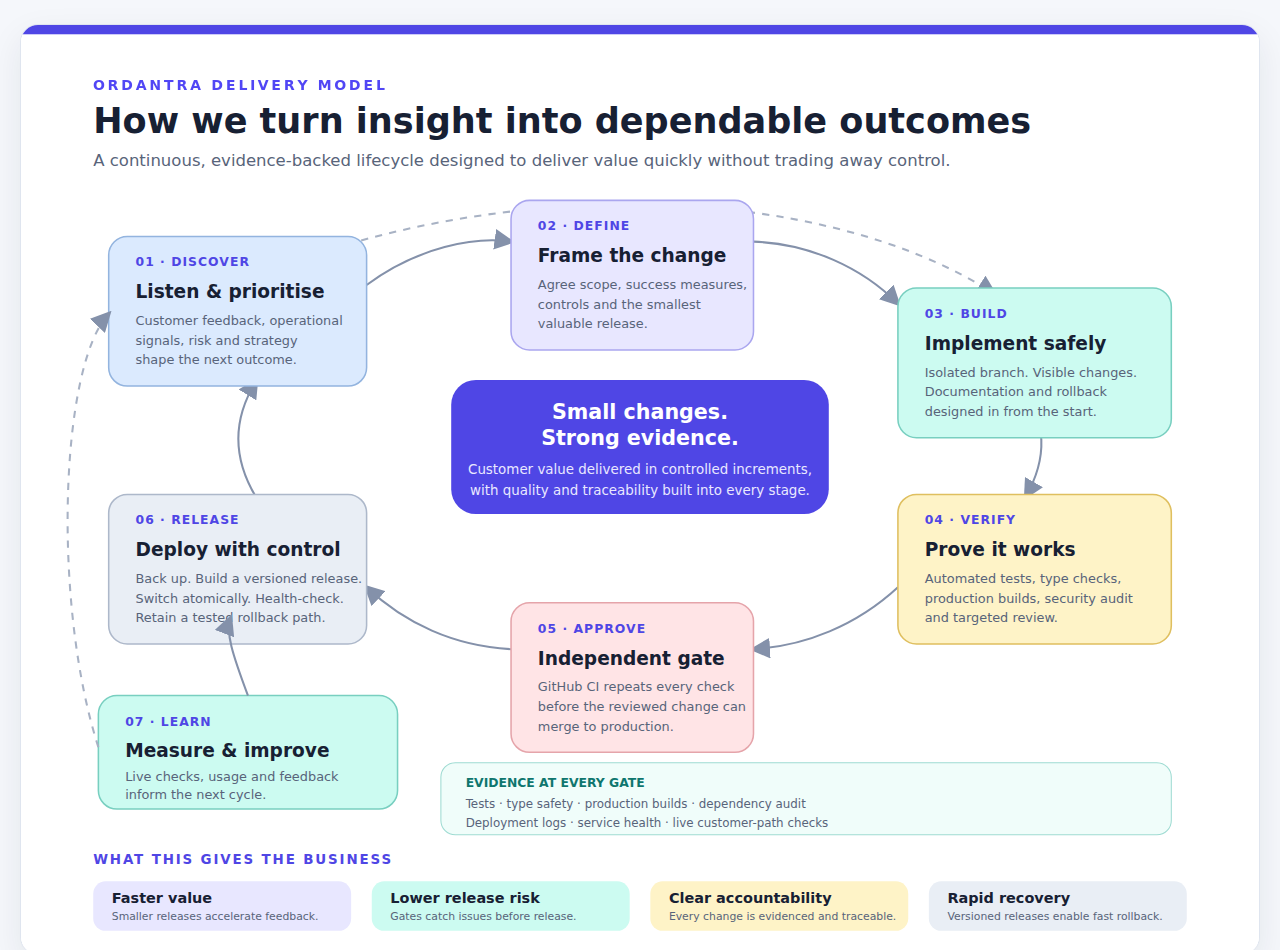
Ordantra is developed as a continuous loop, not a sequence of large, risky launches. We start with customer and operational evidence, define the smallest valuable outcome, build it in isolation, prove it independently, release it with recovery controls, then learn from the live result.
Automated tests, type checks, production builds, dependency audits and targeted review catch problems before release.
Every change carries a traceable record through source control, independent CI validation, deployment and live checks.
Backups, versioned releases, atomic switching and retained rollback paths limit impact when reality differs from the plan.
Consent-led attended remote support
Ordantra now connects an authorised support request, explicit endpoint-user consent and a time-bounded desktop session to the asset record and its audit history.
- Added admin-only support requests with technician identity, reason and a ten-minute expiry.
- Added explicit accept and decline actions in the Windows Companion, with no timeout, locked-device or no-user auto-accept.
- Added a persistent privacy bar, endpoint-controlled termination and expiring technician guest sessions.
- Added signed response handling, pinned transport verification and asset/endpoint audit evidence; general rollout remains gated on trusted Windows code signing.
Agent 3.2–3.4 fleet and user experience
The endpoint experience moved from a passive tray icon to a current, supervised fleet touchpoint across Windows and Linux.
- Added service state, last contact, asset identity, assigned user, Agent version and pending actions to the Windows Companion.
- Made user-initiated update checks durable and added opt-in daily release checks with signed-heartbeat state.
- Added a lightweight Linux desktop companion and delivered it through the existing heartbeat update path.
- Added Windows Companion supervision so the trusted service relaunches the tray process when an interactive user session needs it.
Software intelligence, metering and governance
Endpoint evidence now feeds a governed software register rather than ending as a flat installed-application list.
- Added opt-in, idle-aware active-use metering without titles, URLs, document paths, screenshots or keystrokes.
- Added a canonical software register joining inventory and usage evidence across managed assets.
- Added licence entitlements, allocations, contracts, lifecycle ownership and deployment-versus-entitlement compliance.
- Added explicit aliases, safe admin merges and a compliance CSV export without risky fuzzy auto-merging.
Operational reporting and scheduled evidence
Reporting expanded from summary cards into a reusable operational layer for service performance and accountable follow-through.
- Added filterable service trends, ranked workload and ticket exports with shareable report state.
- Added saved reports, schedules and email delivery backed by workspace-scoped report definitions.
- Connected ticket-list drill-through so report context can move into operational investigation.
- Added endpoint-focused solution content, structured search metadata and first-party conversion measurement for product evaluation.
Independent identity, domain and recovery readiness
Ordantra completed the move from a branded application to an independently operated product boundary.
- Made ordantra.com, app.ordantra.com and the Ordantra mail domains canonical, with legacy compatibility redirects.
- Added Microsoft Entra consent, group discovery, immutable identity linking, preview/apply directory sync and optional linked-member SSO.
- Added password recovery, Privacy and Terms pages, strict domain regression checks and a pilot operations runbook.
- Proved encrypted off-site database/config restoration and added recurring public production health monitoring.
Guided activation from registration to first value
New organisations now receive a usable service foundation and a persistent, measurable path to their first managed endpoint and operational ticket.
- Added editable starter queue, team and SLA defaults for new registrations.
- Added a persistent five-milestone activation path and next-action strip across the app.
- Added workspace-aware, copy-ready Windows and Linux enrolment commands after secure key generation.
- Added platform visibility into tenant activation stalls, improved core empty states and kept the guided demo tenant-separated.
Managed endpoint updates across Windows and Linux
Ordantra now has proven, server-driven update paths for both supported endpoint platforms, with release integrity and post-upgrade reporting built into the workflow.
- Completed an unattended Windows service and tray upgrade through the device-authenticated, hash-pinned MSI channel.
- Added signed Linux update commands with syntax checks, atomic replacement and automatic rollback.
- Separated Windows and Linux baselines throughout fleet, assets and risk views.
- Added clear queued, dispatched, awaiting install, failed, rolled-back and updated telemetry.
Windows endpoint companion and user confirmation
The Windows agent now includes a persistent Ordantra tray experience and a branded, secure way to confirm or correct asset ownership details.
- Added connected status, installed version, pending actions and trusted update controls.
- Added user-facing ownership confirmation with confirm, snooze and correction paths.
- Hardened companion startup, native WPF packaging, locale support and MSI handoff.
- Kept update execution restricted to server-approved, integrity-verified releases.
Complete customer workspace lifecycle
Workspaces are now explicit operational boundaries rather than an implicit first-record selection.
- Added persistent, tenant-validated workspace switching for organisation members.
- Added owner/admin create, rename, archive and restore controls.
- Protected the final active workspace and excluded archived workspaces from live operational context.
- Recorded workspace lifecycle actions with a durable actor history.
Native Windows agent and inventory foundation
The endpoint client moved to a native Windows service and MSI foundation, then expanded into a managed endpoint product.
- Collected system, compute, storage, security, update, network, service, user and installed-software inventory.
- Added per-device authentication, signed heartbeat bytes and replay-resistant sequencing.
- Added privacy-preserving application usage signals and structured asset intelligence views.
- Added safe MSI upgrades with service and companion restart handling.
Service operations administration
Ordantra added the controls teams need to shape day-to-day service delivery without editing seed data or code.
- Added tenant-safe queue, team, automation-rule and SLA policy management.
- Added secure inbound email replies, quoted-history trimming and source-labelled ticket activity.
- Improved people and asset editing with stronger tenant boundaries.
- Added platform administration and privacy-conscious first-party web analytics.
Resolver workspace and asset intelligence
The core app was redesigned around resolver focus, richer operational context and safer change delivery.
- Modernised the application shell, resolver cockpit, queue, problems, reports and settings.
- Added deep asset inventory snapshots and progressive intelligence views.
- Added progressive change requests, CAB readiness and linked execution context.
- Hardened production deployment with atomic releases, migration guards, backups and rollback.
Connected ITSM foundation
The initial connected workflows brought tickets, endpoint risk, the ops graph and controlled change together.
- Shipped the resolver cockpit and needs-action queue.
- Added the operations graph and relationship actions.
- Added endpoint risk policy and automated ticket creation.
- Added change readiness, approvals, execution actions and calendar.
What we are deliberately building next.
These are direction statements, not claims about functionality already available. We publish them so evaluation stays grounded in the current product.